Rapid Render API





An immediate-mode, high-performance WebGL 2D renderer for browser games.
Website & Examples | Docs | API Reference | NPM
What is Rapid?
Rapid is a focused WebGL 2D rendering engine for games and visual tools.
If you want Pixi-level rendering without letting your renderer dictate how your game is organized, Rapid.js is for you!
Full 2D Toolkit
Particles, Light & Shadow, Custom Shaders, Lines, Masks, Render textures, Sprites, Custom Geometry, Filters and more. all from one focused WebGL renderer. Yet it is only 22.5 kB gzipped.
Install
npm install rapid-render
Or via the unpkg CDN
<script src="https://unpkg.com/rapid-render/dist/rapid-render.umd.cjs"></script>
Quick Start
import { Rapid } from "rapid-render";
const canvas = document.querySelector("canvas")!;
const rapid = new Rapid({canvas});
const texture = await rapid.texture.load("./image/sprite.png")
rapid.clear();
rapid.drawSprite({
texture: texture,
x: 40,
y: 40,
});
rapid.flush();
Render a scene
rapid.matrixStack brings the familiar, intuitive save() and restore() flow from Canvas 2D into high-performance WebGL. It reuses typed-array-backed matrix storage and avoids per-transform matrix allocation.
// root
// ├── world
// │ ├── player
// │ └── enemies
// │ ├── enemy #0
// │ ├── enemy #1
// │ └── ...
// └── ui
const stack = rapid.matrixStack;
// 1.root
stack.save();
stack.translate(0, 0);
// 2.world
stack.save();
rapid.drawSprite(player); // player
// 3.enemies
stack.save();
for (let i = 0; i < 2; i++) {
stack.save();
stack.translate(enemyX[i], enemyY[i]);
rapid.drawSprite(enemies[i]); // enemy
stack.restore();
}
stack.restore(); // 3.enemies
stack.restore(); // 2.world
stack.restore(); // 1.root
// ui
rapid.drawSprite(ui);
Reuse MatrixStack Transforms
save() returns parent, local, and world matrix IDs. Saved world IDs can be used with customMatrix within the current frame. Use retainMatrix() to cache transforms across frames and reuse them with save(cached) or cached.world:
const stack = rapid.matrixStack;
const matrix = rapid.matrix;
const cached = stack.retainMatrix(stack.save());
matrix.translate(cached.local, 100, 80);
matrix.multiplyOut(cached.world, cached.parent, cached.local);
stack.restore();
function drawFrame() {
rapid.clear();
stack.save(cached);
rapid.drawSprite({ texture });
stack.restore();
rapid.drawSprite({ texture, customMatrix: cached.world });
rapid.flush();
}
save() accepts a saved state or individual matrix IDs:
stack.save(); // Identity local; inherit parent world.
stack.save(cached); // Reuse the saved world and local IDs.
stack.save(cached.world, cached.local); // Pass both IDs explicitly.
stack.save(cached.world); // Create an identity local.
stack.save(undefined, cached.local); // Calculate world = parent world * local.
Matrices retained with stack.retainMatrix() or created with rapid.matrix.alloc() are managed by you. Release them when no longer needed:
rapid.matrix.free(cached);
const m = rapid.matrix.alloc();
rapid.matrix.free(m);
For more information about matrix transformations, see the Transformations.
Benchmark
Performance Comparison: Rapid vs. Other Renderers and Game Engines
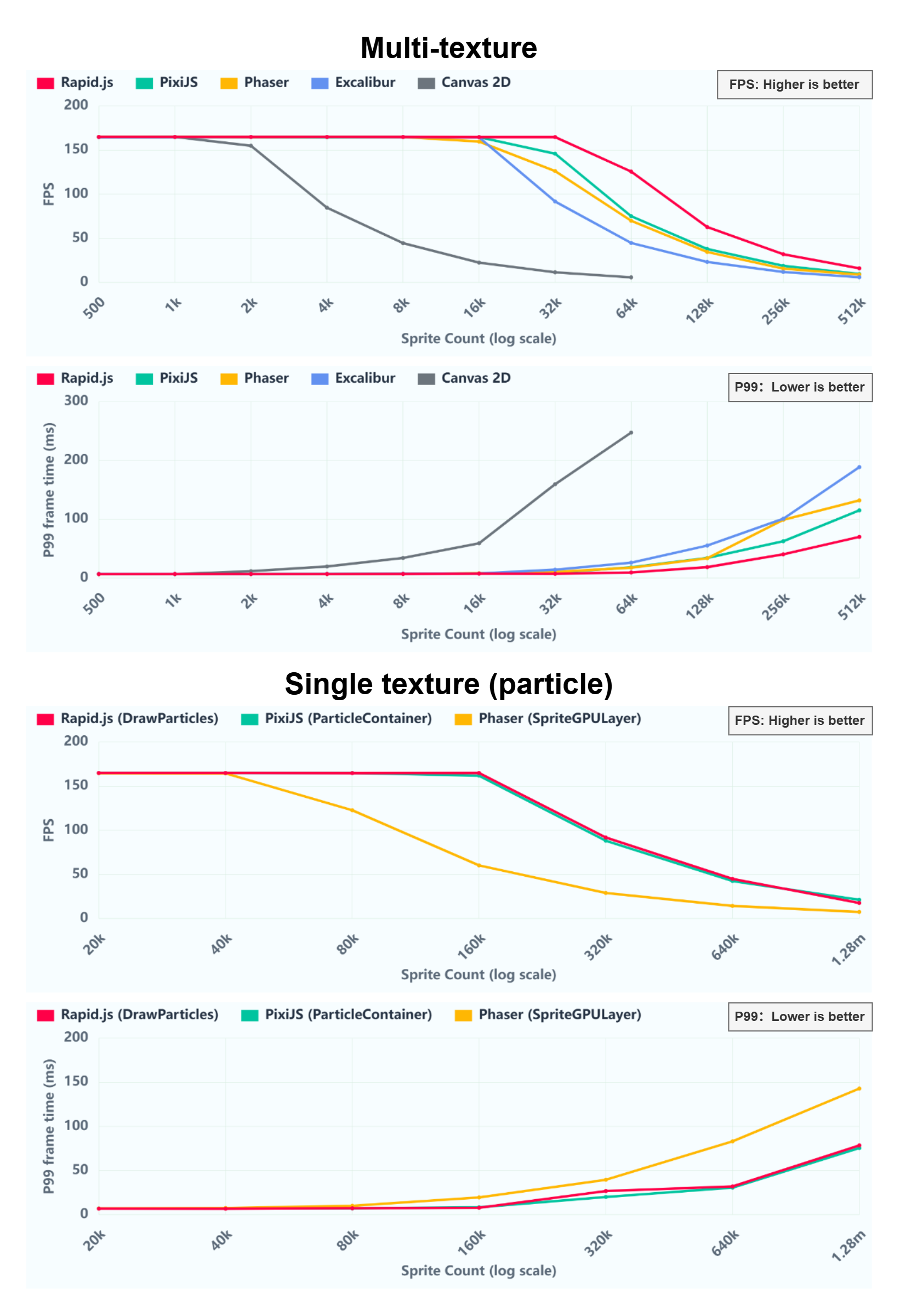
Run Interactive Benchmark Live
Tested on Windows 11 / Intel i7-12850H / NVIDIA RTX 4070 Laptop GPU / Google Chrome (WebGL 2.0)
Who is using Rapid.js?
We'd love to feature your work! Please Submit a Pull Request or tell nightscratch1145@gmail.com to add your game or app to the showcase!

|
Avoid the Zeros by Foxdog Studios Foxdog Studios used Rapid.js to deliver fast download times and smooth multi-sprite rendering for thousands of audience members playing simultaneously on their mobile phones at the Sydney Opera House. |

|
Emoji Party by illusivegames A featured puzzle hit on Poki, surpassing 6 million plays. Rapid.js powers its smooth rendering and instant-play experience across hundreds of thousands of diverse mobile and desktop browser environments. |
Contributing
Contributions, issues, and feature requests are welcome!
Before submitting a Pull Request, please ensure:
- Strict TypeScript (Zero any): All code must pass strict type checking with zero
any, loose casts, or@ts-ignoredirectives. - Passing Checks: Run
npm run buildto ensure clean compilation with zero warnings or errors.